
Prodsmart alternative for small plants, Autodesk Fusion Operations compared with a flat per plant scheduler
ProductionPlanning.ai is a Prodsmart alternative for plants whose problem is the schedule, not shop floor data collection. Prodsmart is now Autodesk Fusion Operations, a cloud MES that tracks what happens on the floor: who worked on which order, on which machine, for how long, with what scrap. It is licensed by admin seats plus a shop floor license for every worker, and Autodesk sells it through its sales team and resellers rather than a public price list. We do one job: load every machine against its real shifts and show which orders will ship late, from 149 USD per plant a month with unlimited users. The comparison below is honest, including where Fusion Operations is the better buy.
Machine shop, This week's schedule, finite capacity per work center
- On time
- Late
- Changeover
On time
0%
Bottleneck
0%
Shortages
0
Prodsmart and Fusion Operations are the same product
Autodesk bought Prodsmart, a Portuguese shop floor software company, in 2018 and later renamed it Autodesk Fusion Operations. Review sites still list it under both names, and Capterra, GetApp and TrustRadius keep the old Prodsmart address in their links. If a vendor, a reseller or a colleague mentions either name, they mean the same cloud system for production tracking, scheduling, inventory and traceability. Everything on this page applies to both.
Why plants look for a Prodsmart alternative
Fusion Operations is well liked by the people who use it, and reviewers praise how quickly operators pick it up. Plants that start looking elsewhere usually hit one of these first.
- Every worker needs a license. Fusion Operations counts admin seats for managers and a separate shop floor license for each operator who logs work, and Autodesk's help center says workers above your license count are switched off when a trial ends
- There is no public price. You buy from Autodesk sales, your account manager or a reseller such as IMAGINiT or Graitec, and third party listings disagree about the number
- It is built around tracking. Its core is recording what happened on the floor. That is valuable, but a plant that ships late needs a forward plan that says on Tuesday that Friday's order will miss
- It pulls you toward the Autodesk stack. Fusion Operations is sold as the shop floor layer next to Fusion, Fusion Manage and Vault, which is a strength if you design in Fusion and a detour if you do not
- The plant already runs QuickBooks and an ERP or a spreadsheet that works. What it lacks is finite capacity on each machine
If most of that list fits your plant, the real decision is not which MES to buy. It is whether you need data from every station first, or a schedule you can trust first.
What Autodesk Fusion Operations includes
This is the capability list from Autodesk's help center and product pages, with Capterra for integrations. It is a capable system, and its production tracking is genuinely strong.
| Area | What Fusion Operations covers |
|---|---|
| Production tracking | Yes, real time, from tablets or phones at the station |
| Production orders and scheduling | Yes, schedules teams, machines and materials |
| Bill of materials and product trees | Yes |
| Lot tracking and traceability | Yes, from batch to finished product |
| Inventory | Yes, with barcode scanning |
| Quality and waste recording | Yes |
| Work instructions | Yes |
| Equipment maintenance | Yes |
| Cost tracking | Yes, across workers, machines and materials |
| Integrations listed on Capterra | Autodesk Fusion, Autodesk Vault, QuickBooks Online Advanced, Shopify, Zapier |
| Licensing | Admin seats plus a shop floor license per active worker |
| Deployment | Cloud, in the browser, with Android and iOS apps |
The shape matters more than any single row. Fusion Operations is strongest at capturing the actual: who did what, when, and what it cost. We are strongest at the plan: what each machine can finish before the due date.
Autodesk Fusion Operations vs ProductionPlanning.ai, side by side
| What matters | ProductionPlanning.ai | Fusion Operations |
|---|---|---|
| What it is | Finite capacity production scheduling software | Cloud MES for production tracking and traceability |
| Pricing model | Flat per plant | Admin seats plus a shop floor license per worker |
| Users | Unlimited on every plan | Each active worker takes a shop floor license |
| Published price | Yes, on the pricing page | No, sold through Autodesk sales and resellers |
| Entry price | 149 USD per plant per month | Not published. Capterra and SelectHub list 2,000 USD per user per year for the Basic plan |
| Finite capacity on every machine and shift | The whole product, on every plan | Scheduling of teams, machines and materials, focus is tracking |
| Late order warnings with projected finish dates | Yes | Delays show up in tracking once work is under way |
| Operator reporting from the floor | Yes on Plant, start and finish from a screen at the machine | Yes, the core of the product, with scrap, downtime and labor time |
| Lot traceability | No | Yes |
| Maintenance and work instructions | No | Yes |
| Autodesk Fusion and Vault link | No | Yes |
| Best for | Plants that ship late and need the machine plan fixed now | Plants that want paperless tracking and traceability at every station |
Autodesk publishes no dollar amounts for Fusion Operations, so every figure in its column is attributed to the listing that published it. The full cost breakdown, including why the third party numbers disagree, is in Fusion Operations pricing.
What per worker licensing costs a 15 person plant
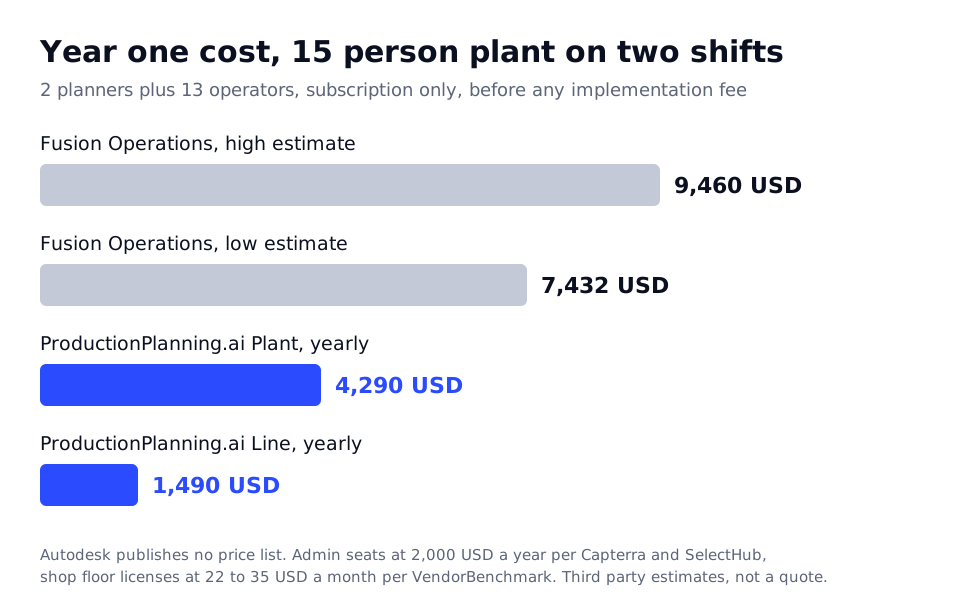
The difference between the two models grows with every operator you want in the system. Take a plant with 2 people in the office who plan and 13 operators on two shifts.
| Plant situation | Fusion Operations | ProductionPlanning.ai |
|---|---|---|
| 2 planners or managers | 2 admin seats, 4,000 USD a year at the 2,000 USD Capterra figure | Included |
| 13 operators logging work | 13 shop floor licenses. VendorBenchmark estimates 22 to 35 USD per kiosk seat a month, 3,432 to 5,460 USD a year | Included |
| Hiring a third shift of 6 | 6 more shop floor licenses | No change |
| Year one, before implementation | About 7,400 to 9,500 USD, by those estimates | 1,490 USD on Line, or 4,290 USD on Plant |
| Implementation | VendorBenchmark estimates 8,000 to 45,000 USD | None, set up in an afternoon |
The fair caveat: the Fusion Operations money buys data from every station, traceability and maintenance records, which we do not do. If that is the gap in your plant, price is the wrong test. Our plans and what each includes are on the pricing page.
Where Fusion Operations is the better choice
We would rather you buy the right system than the wrong one from us. Choose Fusion Operations if any of these applies.
- You need lot traceability from raw batch to finished product, for a customer audit or a recall plan
- You want operators to log time, scrap and downtime at every station and see real OEE, not estimates
- Your engineers design in Autodesk Fusion or manage files in Vault, and you want one vendor from CAD to the shop floor
- You want digital work instructions and maintenance schedules in the same system as production
- Paper travelers are the main source of errors, and you have the budget to put a device at each station
For a plant that wants a paperless floor and an audit trail, Fusion Operations is a reasonable, well supported choice, and Autodesk is not going anywhere.
Where a dedicated scheduler wins
- Finite capacity on every machine and shift, holidays and planned maintenance included, on every plan
- Projected finish dates for every open order, and the week's bottleneck named with the jobs it will make late
- Setup times per product family on Plant, with similar jobs grouped so changeovers stop eating capacity
- Sequencing rules you compare before you publish: earliest due date, shortest operation first, customer priority
- Unlimited users, so every operator, lead and sales rep sees the plan without a license count
- A published price, no implementation project, and monthly plans you can cancel any time
- Sits next to QuickBooks, your ERP or your spreadsheet instead of asking the floor to change how it records work
The clearest fit is a 5 to 60 person plant that knows roughly what happened yesterday and still cannot say which order ships late next week. See the machine view on machine scheduling software, the operator screen on shop floor scheduling software, and the load chart on capacity planning software.
How to get a real schedule without a shop floor rollout
1. Export open orders and routings
Pull open orders with product, quantity, due date and the operation steps with setup and run times, from Fusion Operations, your ERP or a spreadsheet. The routing is what turns a due date list into a plan.
2. Enter machines and shifts
Add a work center per machine, line or cell, with the shifts each one runs and the holidays and maintenance windows. For a 20 machine plant this usually takes about an hour.
3. Run the schedule and read the bottleneck
The first run gives a projected finish date for every open order and names the work center limiting the week. It is often not the machine everyone assumed.
4. Add tracking later if you need it
Many plants run the schedule on its own and add station tracking only where it pays. On Plant, operators already start and finish jobs from a screen at the machine, and the plan updates from that status.
Questions people ask before choosing Prodsmart
What is the best alternative to Prodsmart?
It depends on the gap. For a like for like system with inventory and shop floor tracking, buyers usually shortlist MRPeasy and Katana, which we compare on our MRPeasy alternative and Katana alternative pages. If late orders are the real problem, a dedicated finite capacity scheduler fits better and starts at 149 USD per plant a month.
Is Prodsmart now Autodesk Fusion Operations?
Yes. Autodesk acquired Prodsmart in 2018 and renamed it Fusion Operations. It is the same cloud product for production tracking, scheduling, inventory and traceability, sold through Autodesk and its resellers. Many review sites still list it under the Prodsmart name, so older reviews apply to the current product.
How much does Fusion Operations cost?
Autodesk does not publish a list price. Capterra and SelectHub list 2,000 USD per user per year for the Basic plan, and each operator who logs work needs a shop floor license on top of admin seats. The worked numbers for a real plant are in Fusion Operations pricing.
Does Fusion Operations charge per user?
Yes. It uses two license types: admin seats for people who work in the management interface, and shop floor licenses for each active worker. ProductionPlanning.ai includes unlimited users on every plan and prices per plant, so adding a shift does not change the bill.
Does Fusion Operations integrate with QuickBooks?
Capterra lists an integration with QuickBooks Online Advanced, along with Autodesk Fusion, Autodesk Vault, Shopify and Zapier. Check the exact scope with Autodesk before you buy, since it is not a full accounting module.
Can I use a scheduler instead of an MES?
Fix the schedule this week, for a flat price per plant
Start on the Line plan at 149 USD a month with the whole plant included, or run the demo on a sample week of orders first. You will see your own bottleneck the same afternoon.
Your data stays yours. Export or delete it any time. No card to try the demo.