
JobPack alternative for job shop production scheduling in the browser, with a published price per plant
ProductionPlanning.ai is a JobPack alternative for job shops that want a finite capacity schedule without a server install or a quote call. JobPack is a dedicated production scheduler from Elgin, Illinois, sold since 1992, installed on your own server and priced by quote: Capterra lists it from 10,000 USD. We schedule every machine against its real shifts and setups in the browser, from 149 USD per plant a month with unlimited users and nothing to install. JobPack does some things we do not, such as machine monitoring and digital job packets, and the comparison below says so.
Free for 14 days on your own orders and machines. No card.
Machine shop, This week's schedule, finite capacity per work center
- On time
- Late
- Changeover
On time
0%
Bottleneck
0%
Shortages
0
What JobPack is, and who it is built for
JobPack is production scheduling software for job shops and make to order plants, not an ERP. JobPack, Inc. is privately owned, based in Elgin, Illinois, and says it has served more than 1,100 industrial companies across North America and Europe since 1992. In Europe the same system is sold as JobDISPO. Its core is a visual planning board where a scheduler drags jobs between machines, with finite capacity scheduling, what if scenarios run in a test mode that does not touch the live plan, bottleneck alerts and digital job packets for the floor. Around that it sells machine monitoring, shop floor data collection and analytics. It runs next to your ERP or MRP, or on its own. That makes it one of the closest products to ours, and a fair comparison is about how you buy and run it more than what it does.
Why job shops look for a JobPack alternative
JobPack is a capable scheduler with three decades behind it. Shops that look elsewhere usually hit one of these before they ever see the software.
- There is no price on the site. Every path leads to a demo request, and third party listings disagree: Capterra shows a starting price of 10,000 USD priced per feature, SoftwareFinder about 100 USD a month on a quote basis
- It is installed on premise. JobPack's own site describes it as installed on the server with only shortcuts on shop desktop computers, so someone has to own that server, its backups and its upgrades
- Updates come through a maintenance contract. JobPack says the contract covers unlimited support and annual version updates, which is a yearly line to budget on top of the license
- It is a project, even if a small one. JobPack includes installation, ERP integration and training with a project manager, which is good service and also means weeks of calendar before the first live schedule
- Remote access is a question for IT. Seeing the board from home or from a second building depends on how your server and network are set up
If that list sounds familiar, the question is not whether you need a scheduler. You do. It is whether you want one on your server or in the browser.
JobPack vs ProductionPlanning.ai, side by side
| What matters | ProductionPlanning.ai | JobPack |
|---|---|---|
| What it is | Finite capacity production scheduling software | Finite capacity production scheduling software |
| Where it runs | In the browser, hosted for you | Installed on your server, shortcuts on shop PCs |
| Published price | Yes, on the pricing page | No, quote after a demo |
| Entry price | 149 USD per plant a month, or 894 USD a year | Capterra lists from 10,000 USD, priced per feature |
| Users | Unlimited on every plan | Per the quote |
| Visual planning board, drag and drop | Yes, Gantt by work center and by order | Yes, the Planning Board is its core |
| What if before you publish | Plan versions compared side by side, on Plant | Test mode scenarios, reversible |
| Late order and bottleneck warnings | Projected finish date for every order, the week's bottleneck named | Bottleneck alerts |
| Operators at the machine | Start and finish jobs from a screen, on Plant | Digital job packets and shop floor data collection |
| Machine monitoring from the controls | No | Yes, sold as part of its system |
| ERP connection | Spreadsheet import and ERP export on Plant, API on Group | Integration with your ERP or MRP, set up by JobPack |
| Setup | Import a spreadsheet the same afternoon | Installation, integration and training with a project manager |
| Updates | Included, no version upgrades to run | Annual version updates under the maintenance contract |
| Best for | 5 to 60 person shops that want the schedule this week and no server to run | Shops that want machine monitoring and job packets from one vendor, with IT to host it |
JobPack details come from jobpack.com. JobPack publishes no dollar amounts, so the price in its column is the figure Capterra lists, not a quote. Our plans and limits are on the pricing page.
What JobPack costs next to a flat per plant price
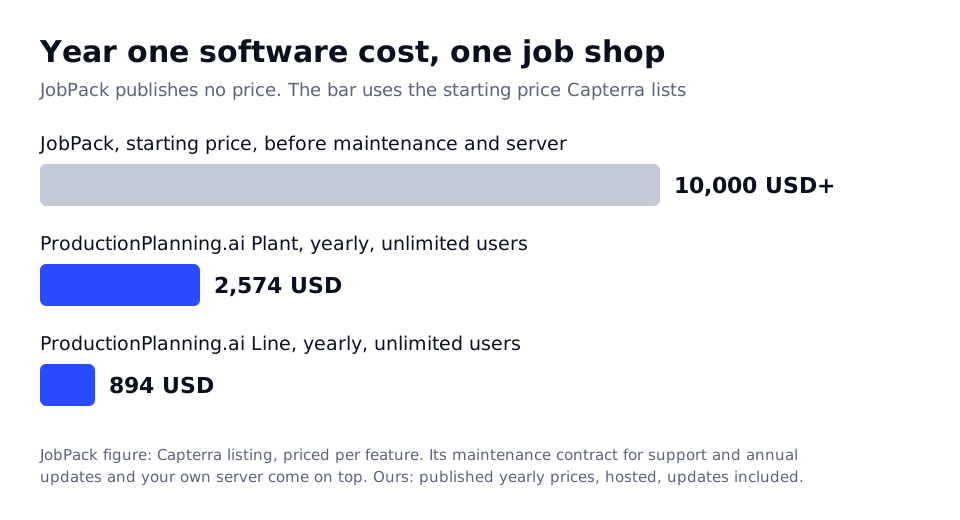
JobPack does not publish a price, so this is a sketch from the one figure a directory lists. Read it as a starting point for your own quote, not as JobPack's number.
| Cost line | JobPack, third party listing | ProductionPlanning.ai |
|---|---|---|
| Software, year one | From 10,000 USD per Capterra, priced per feature | 894 USD on Line, 2,574 USD on Plant, paid yearly |
| Yearly after that | Maintenance contract for support and annual updates, price on the quote | The same subscription, updates included |
| Server and IT time | Your server, backups and upgrades | None, it runs in the browser |
| Installation and training | Included by JobPack, scheduled as a project | Not needed, import a spreadsheet |
| Three year software total | 10,000 USD plus three years of maintenance | 2,682 USD on Line, 7,722 USD on Plant |
Over three years the totals can land close together, which is the honest result. If price alone decides it, get JobPack's maintenance figure in writing and compare. Most shops decide on something else: whether they want a server in the building, and whether they want to wait for a project or schedule this week.
Where JobPack is the better choice
We would rather you buy the right scheduler. Choose JobPack if any of these applies.
- You want machine monitoring straight from the controls, feeding actual cycle times back into the schedule. We do not read machine data
- You want digital job packets, with drawings and instructions at the machine, from the same vendor as the schedule
- Your IT policy keeps production systems on premise, or the shop floor network has no reliable internet
- You want the vendor to build and own the ERP integration, with a named project manager, rather than work from a spreadsheet import
- You run plants in Europe as well, where the same system is supported as JobDISPO
For a shop with those needs and someone to look after the server, JobPack is a mature, focused scheduler, and it is one of the few products in this market that does what we do.
Where a browser based scheduler wins
- A published price, 149 USD per plant a month on Line and 429 USD on Plant, monthly and cancellable, or six months' price for a year (50 percent off)
- Nothing to install, back up or upgrade, and the board opens on any screen in the shop, the office or at home
- Unlimited users, so every shift lead, operator and salesperson can see the plan without a license count
- Finite capacity on every machine and shift, with holidays and maintenance windows, on every plan
- Setup times per product family and automatic grouping of similar jobs on Plant, so changeovers stop eating capacity
- Projected finish dates for every open order and the week's bottleneck named with the jobs it will make late
- Live the same afternoon from a spreadsheet of open jobs and routings, with no project plan
The clearest fit is a 5 to 60 person job shop that has outgrown the whiteboard and does not want another server. See how we load machines on machine scheduling software and handle make to order work on job shop software. If you are also looking at an ERP with scheduling built in, our JobBOSS alternative and ProShop ERP alternative pages compare those, and the PlanetTogether alternative page covers the other dedicated scheduler buyers shortlist.
How to compare the two on your own jobs
1. Export open jobs and routings
Pull open jobs with part number, quantity and due date, and each operation with its work center, setup and run time, from your ERP or from the spreadsheet you schedule in today. Both products start from this list.
2. Enter work centers and shifts
Add each machine or cell with the shifts it runs, holidays and planned maintenance. For a shop with 20 machines this takes about an hour, and it is what makes the schedule finite.
3. Run a week next to your current plan
Publish the schedule and compare the late order list and the bottleneck with what the floor sees today. Do the same in a JobPack demo with the same jobs, if you have one booked.
4. Decide on the way you want to run it
If both schedules agree, the choice comes down to server or browser, quote or published price, and whether you need machine monitoring. That is a short decision once you have seen your own jobs in each.
Questions people ask before choosing JobPack
What is the best alternative to JobPack?
It depends on why you are looking. If you want a full ERP with scheduling inside, buyers compare JobBOSS2, ProShop and Global Shop Solutions. If you want a dedicated scheduler like JobPack but in the browser with a published price, ProductionPlanning.ai starts at 149 USD per plant a month with unlimited users. Our best production scheduling software roundup compares eleven tools with real prices.
How much does JobPack cost?
JobPack does not publish pricing and quotes after a demo. Capterra lists a starting price of 10,000 USD, priced per feature, and SoftwareFinder shows about 100 USD a month on a quote basis. Budget for the maintenance contract as well, which JobPack says covers unlimited support and annual version updates.
Is JobPack cloud based?
JobPack describes itself as installed on your server, with only shortcuts on the shop desktop computers, and mentions easy server to server migration. Ask JobPack directly about hosted options. ProductionPlanning.ai runs in the browser with nothing to install.
Does JobPack integrate with my ERP?
Yes. JobPack says it integrates with your existing ERP or MRP system or runs stand alone, and installation, integration and training are included with a project manager. ProductionPlanning.ai imports open jobs and routings from a spreadsheet and exports the schedule to your ERP on the Plant plan, with an API on Group.
Does JobPack do machine monitoring?
Yes. JobPack sells machine monitoring with real time visibility on each machine, alongside shop floor data collection and analytics. ProductionPlanning.ai does not read machine controls. Operators start and finish jobs from a screen at the machine on the Plant plan, which updates the schedule.
Can I try ProductionPlanning.ai before I buy?
Yes. Run the demo on a sample week of orders, or start on Line at 149 USD a month and cancel any time. Most shops import their open jobs and see a first schedule the same afternoon, with no installation and no sales call.
Get a finite capacity schedule this week, without a server
Start on the Line plan at 149 USD a month with the whole shop included, or run the demo on a sample week of orders first. You will see your own bottleneck the same afternoon.
Your data stays yours. Export or delete it any time. No card to try the demo.